BB Preflight · by FOREST LIFE*
Check your Mac’s open doors before takeoff.
BB Preflight is a free tool that checks one Mac. It looks for doors reachable from outside, keys left in files and more, then gives you a three-level go/no-go call.
- Mac only
- Free
- Read-only
- Ready-made requests for your AI
WhyHow many doors are open on your Mac?
Almost nobody can answer that right away. I could not either.
While building apps with AI, my Mac quietly picked up new ways in, and new keys. Keys left written in files were one of them. Even after I checked by hand, I had missed some. BB Preflight grew out of that mistake.
As Japan’s IPA (Information-technology Promotion Agency) has warned, attackers no longer go after big companies only. And keeping your Mac safe is not something you have to leave to someone else. The check takes one to three minutes. If you are thinking “right, I will look after my own Mac,” start today.
PromisesThree promises
Read-only. It changes nothing.
It only looks. It never deletes files or changes settings. Whether to fix anything is up to you.
No admin password (no sudo)
It never asks for your password. It runs with your normal user permissions.
Your results stay on your Mac
Check results are kept on this Mac only. Nothing is sent to any server.
The source code is public on GitHub, so anyone can check what it does. It runs on the python3 that ships with macOS, so there is nothing else to install.
ChecksWhat it checks
BB Preflight goes through the 21 items below and marks each one with a colored dot. NEW arrived in 1.3.0; UPDATED means 1.3.0 checks more there.
- FirewallIs the wall that blocks incoming connections switched on?
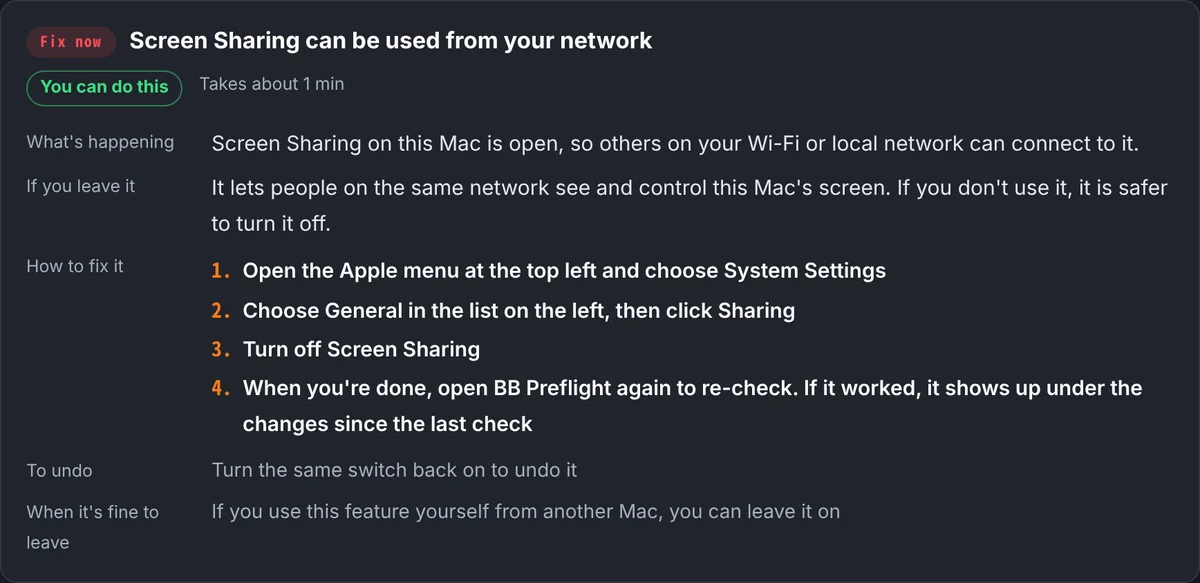
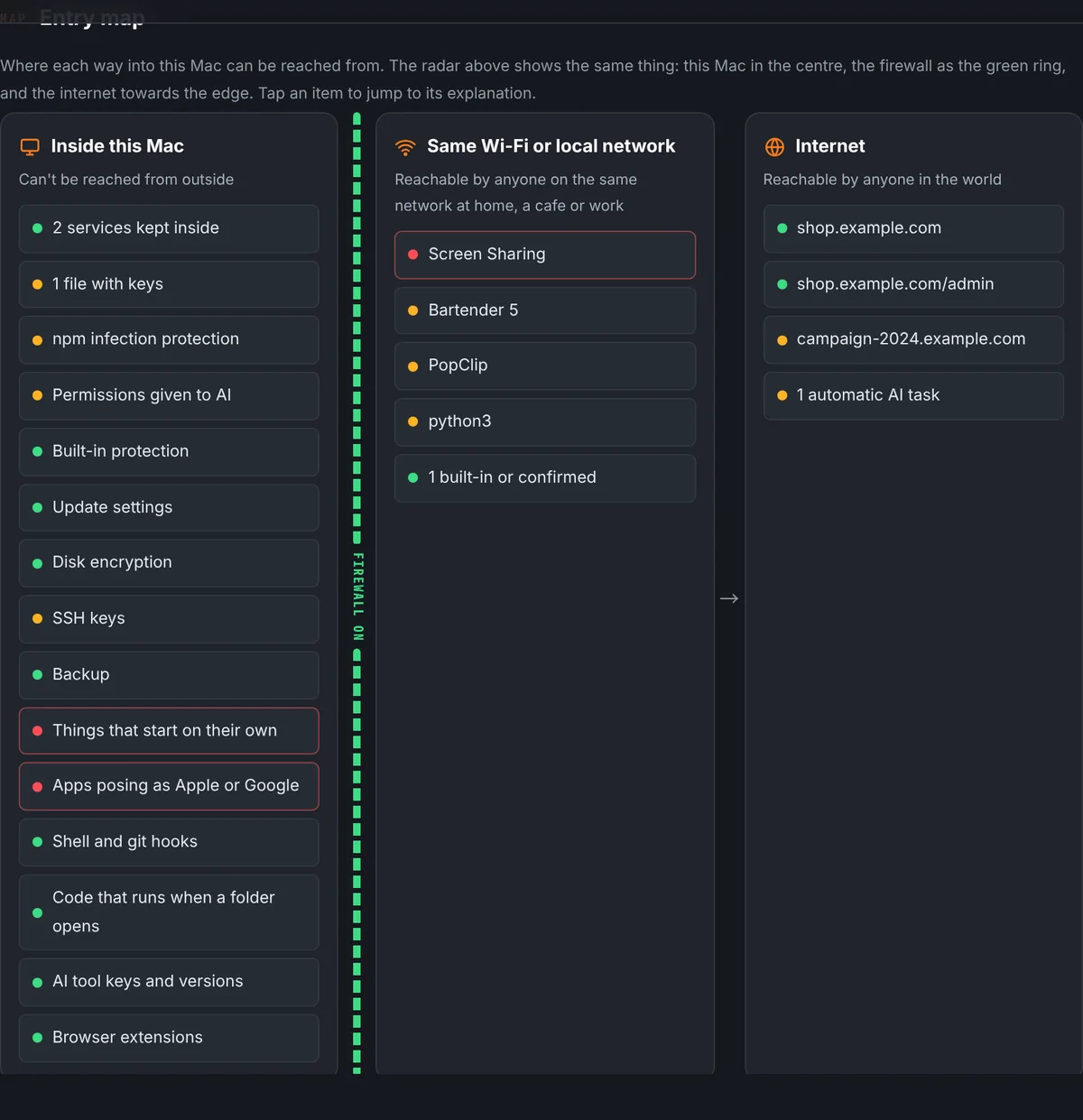
- Remote access and sharingCan screen sharing, file sharing and similar services be reached from outside?
- Apps reachable from outsideAre any apps accepting connections from the same Wi-Fi or beyond?
- Public websitesAre the sites and admin pages you listed visible from outside?
- API keys in filesUPDATEDAre any keys sitting in plain files?
- AI running on its ownIs anything set up to run AI on a schedule without you?
- npm infection protectionAre you protected against hijacked packages when you install from npm?
- Permissions given to AIHow much have you handed over to your AI tools?
- Built-in protectionAre SIP and Gatekeeper on, and is automatic login off?
- Update settingsDoes malware-protection data install automatically, and are any delivered updates still waiting?
- Disk encryptionIf you lose your Mac, is the data unreadable?
- SSH keysAny keys without a passphrase, or settings that let others log in?
- Remote-control appsIs there an app installed that lets someone else control this Mac?
- BackupIf something goes wrong, can you get back to where you were?
- Things that start on their ownDoes anything start at boot or login from an odd place, or from an unknown maker?
- Apps posing as Apple or GoogleIs there an app using Apple’s or Google’s name without their real signature?
- Shell and git hooksDoes something you don’t know run every time you use Terminal or git?
- Code that runs when a folder opensAre there settings that run code when an AI tool or editor opens a folder, or invisible text hidden in instruction files?
- AI tool keys and versionsUPDATEDCan others read your AI tools’ keys? Are the tools on versions with known holes fixed?
- Browser extensionsAny extension reported to steal AI chats, or installed from outside the official store?
- AI pentest results (Strix)NEWAre serious Strix findings still open? Did a zero-finding run actually finish?
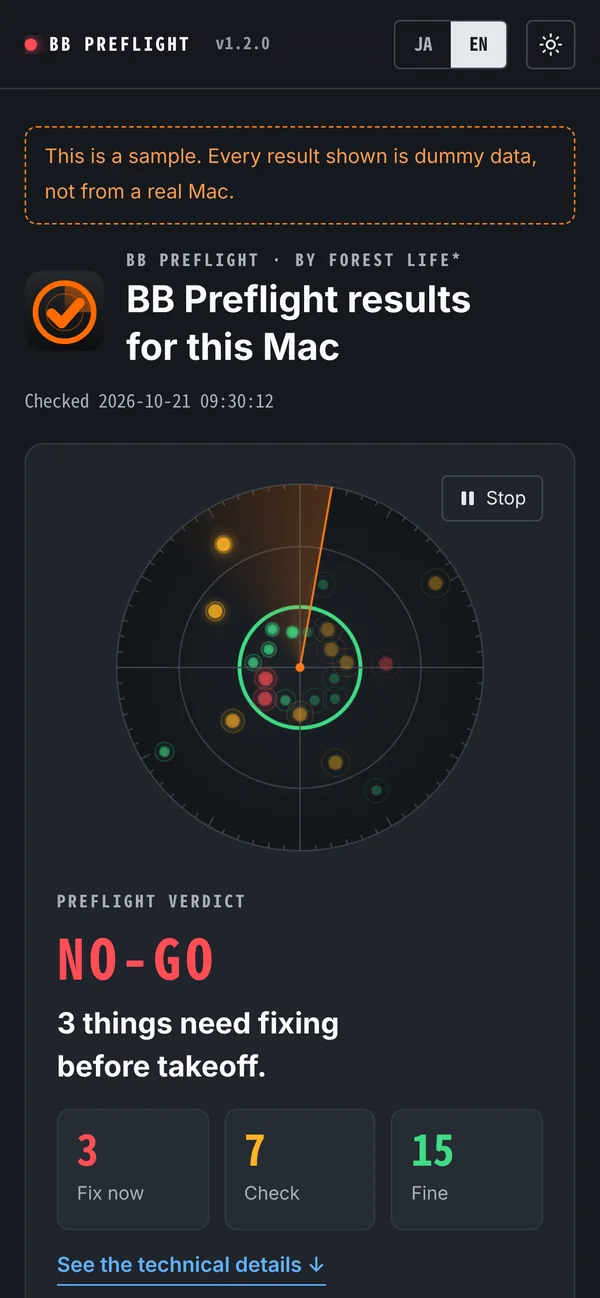
- NO-GOThere is something to fix before takeoff.
- CAUTIONNothing urgent, but some things are worth a look.
- CLEARNothing stood out in what was checked.
ScreensA look at the report
All screens show dummy sample data.
InstallGet started in three steps
Download
Get it from the link in the email. Safari unpacks it into a folder named BB-Preflight for you. If you still have a zip file, double-click it to open the folder.
Open
Double-click Preflight.command inside the folder. The first time, it sets itself up and opens your list (a short note of what to check). It also puts a launcher named BB Preflight in Applications.
Fill in your list and run the check
Add your own sites and the services you use to the list, save it, and open BB Preflight again. A check usually takes 1 to 3 minutes, then the report opens in your browser.
If macOS blocks it
The first time you open it, macOS may refuse to open it. It does this for files downloaded from the internet, just to be safe.
Go to System Settings > Privacy & Security, scroll down, and click “Open Anyway”. macOS asks once more; click “Open Anyway” again.
Since macOS 15, right-click > Open no longer lets you allow it.
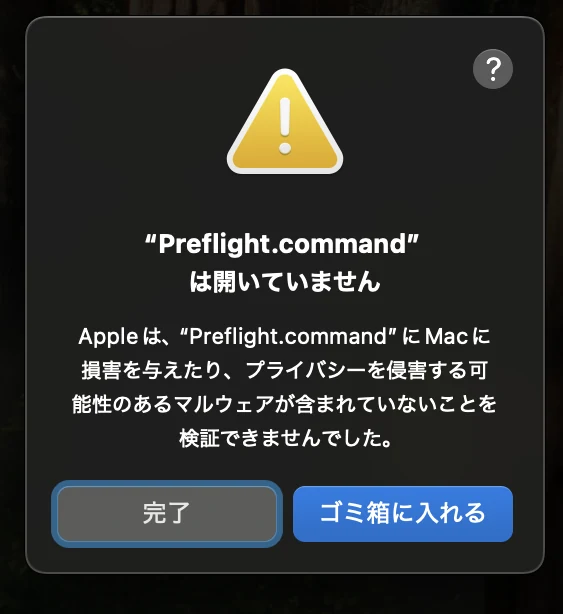
1. The first time, macOS stops it like this. Click “Done”. 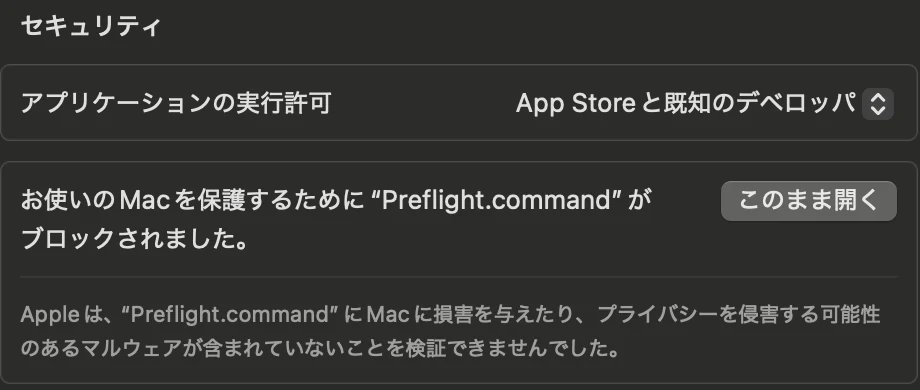
2. In Privacy & Security, scroll down and click “Open Anyway”. 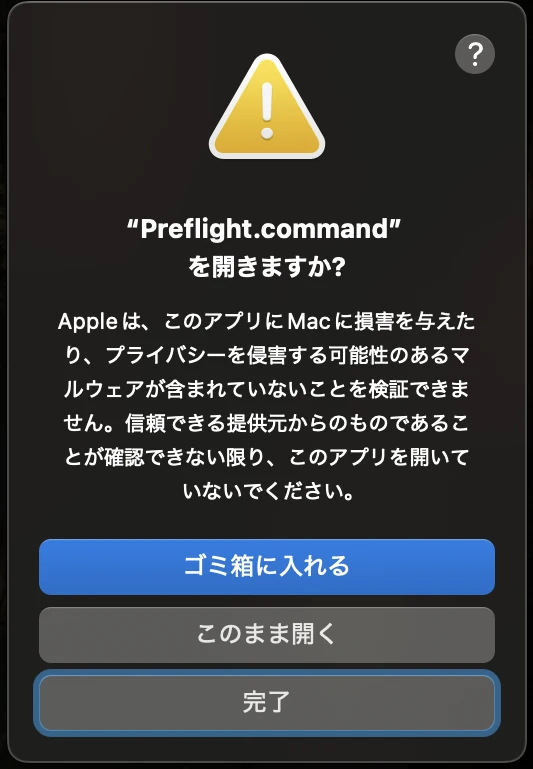
3. When macOS asks again, click “Open Anyway”.
Screens are from macOS in Japanese; the buttons are in the same places in English.
LimitsWhat it can’t do
- It does not test whether a door can actually be reached from your LAN. It only reads this Mac’s settings and the doors that are open.
- “No problems” is not a guarantee of safety. It means nothing stood out in what was checked.
- It is a free tool with no warranty. Decisions based on the results are your own.
FAQQuestions
Are my check results sent anywhere?
No. Results stay on your Mac. Signing up with your email is not linked to your results in any way.
Does it work on Windows?
Not for now. BB Preflight is Mac only.
How much does it cost?
It’s free.
Can I fix things myself?
Usually, yes. Each item in the report’s to-do list explains how to fix it, about how long it takes, and how to undo it. Items you can finish in System Settings are marked “You can do this”; ones that need more know-how are marked “Best done with an expert or an AI”.
If a fix feels hard, press “Copy request” on the card and paste it into an AI such as Claude Code. The AI works through the fix with you, for your Mac. The request never includes key values or file contents. Before letting the AI change anything, ask it to show you what it will change, and go ahead only when you’re comfortable.
After fixing, open BB Preflight again and run a check. Fixed items show up under “Changes since the last check”.
Do I need to install anything?
No. It runs on the python3 that ships with macOS, and it never needs your admin password.
Can I check for myself that it only reads?
Yes. The source code is public on GitHub, and if you are technical you can run it straight from there. The ready-to-use zip is emailed to people who sign up. View the source on GitHub
StoryWhy it is free
“I thought I had checked” is not protection. So I started building a tool that measures the real state of a Mac.
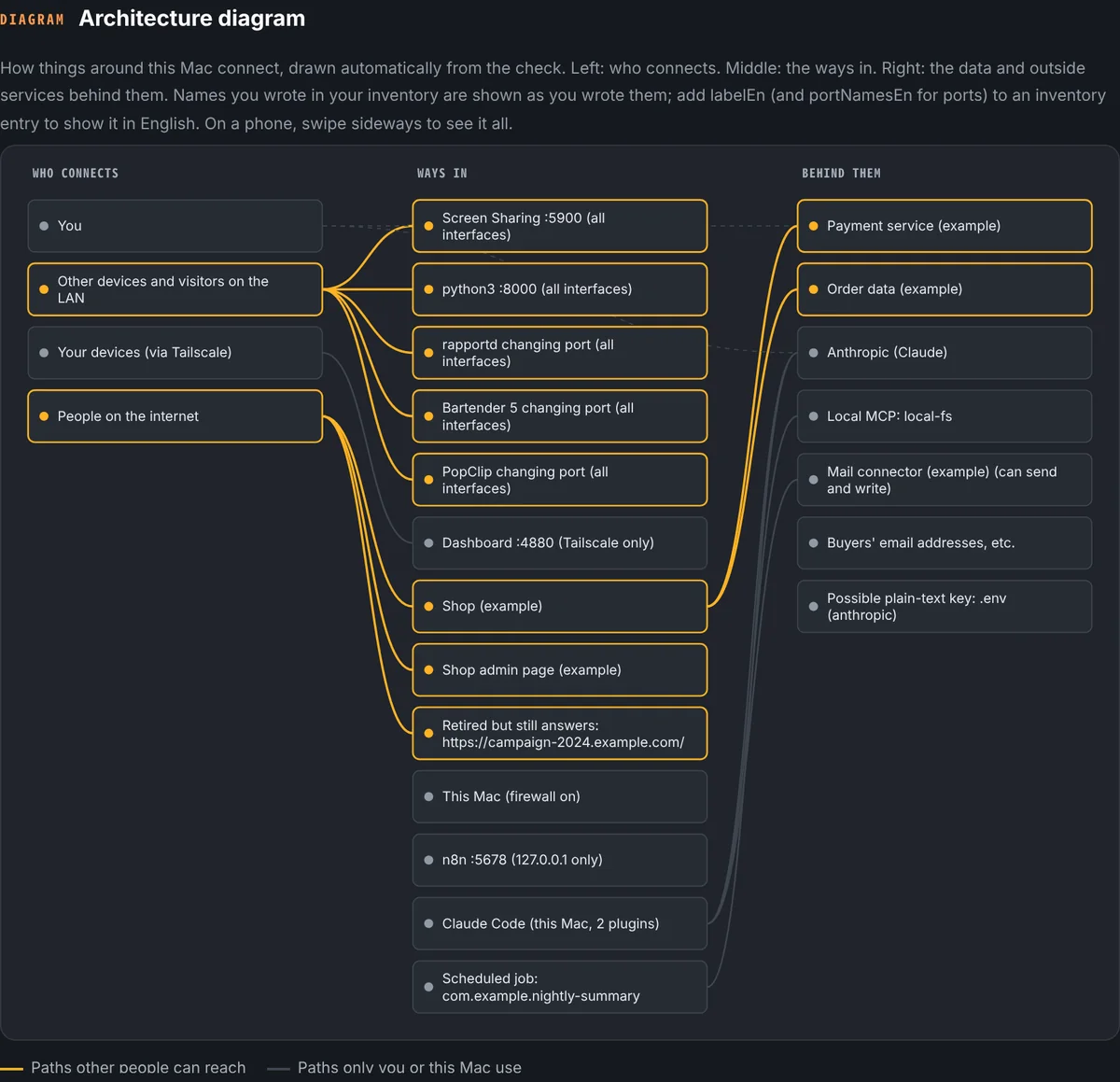
Along the way I found CyberRiskScape, an open-source tool released under the Apache License 2.0. Draw a system diagram, and it finds weak spots with more than 200 threat rules. BB Preflight builds that diagram automatically from what it measures on your Mac, so this engine can assess it too (an optional add-on for experts). I wanted the way experts think to be usable by everyone. My sincere thanks to its author, TAKASHI OMOTO, for publishing it.
Plenty of Macs carry the same blind spots. That is why I made it free for anyone to use. A few minutes of checking may turn up a door you did not know about. Run a preflight check once and see.
BB Preflight is an independent app and is not an official part of CyberRiskScape.
DownloadDownload
Sign up and we’ll send a confirmation email. Click its link and the download comes next.